<!DOCTYPE html>
	<html lang="vi" xmlns="http://www.w3.org/1999/xhtml" prefix="og: http://ogp.me/ns#">
	<head>
<title>Kỹ năng cơ bản để sử dụng Internet an toàn đối với trẻ em ngày nay</title>
<meta name="description" content="Kỹ năng cơ bản để sử dụng Internet an toàn đối với trẻ em ngày nay - Savefile - Tin Tức -...">
<meta name="author" content="Sở Thông tin và Truyền thông tỉnh Tây Ninh">
<meta name="copyright" content="Sở Thông tin và Truyền thông tỉnh Tây Ninh [sotttt@tayninh.gov.vn]">
<meta name="generator" content="NukeViet v4.5">
<meta name="viewport" content="width=device-width, initial-scale=1">
<meta name="google-site-verification" content="077XjaFBH6kSEGGYGl6jYmuHvqQuCCIezag0e6V2-WY">
<meta http-equiv="Content-Type" content="text/html; charset=utf-8">
<meta property="og:title" content="Kỹ năng cơ bản để sử dụng Internet an toàn đối với trẻ em ngày nay">
<meta property="og:type" content="website">
<meta property="og:description" content="Savefile - Tin Tức - https&#x3A;&#x002F;&#x002F;sotttt.tayninh.gov.vn&#x002F;vi&#x002F;news&#x002F;savefile&#x002F;thong-tin-tuyen-truyen&#x002F;ky-nang-co-ban-de-su-dung-internet-an-toan-doi-voi-tre-em-ngay-nay-3386.html">
<meta property="og:site_name" content="Sở Thông tin và Truyền thông tỉnh Tây Ninh">
<meta property="og:url" content="https://sotttt.tayninh.gov.vn/vi/news/savefile/thong-tin-tuyen-truyen/ky-nang-co-ban-de-su-dung-internet-an-toan-doi-voi-tre-em-ngay-nay-3386.html">
<link rel="shortcut icon" href="https://sotttt.tayninh.gov.vn/uploads/logo_1.png">
<link rel="canonical" href="https://sotttt.tayninh.gov.vn/vi/news/savefile/thong-tin-tuyen-truyen/ky-nang-co-ban-de-su-dung-internet-an-toan-doi-voi-tre-em-ngay-nay-3386.html">
<link rel="alternate" href="https://sotttt.tayninh.gov.vn/vi/news/rss/" title="Tin Tức" type="application/rss+xml">
<link rel="alternate" href="https://sotttt.tayninh.gov.vn/vi/news/rss/https-sotttt-tayninh-gov-vn-vi-news-quy-hoach-tinh-tay-ninh/" title="Tin Tức - QUY HOẠCH TỈNH TÂY NINH" type="application/rss+xml">
<link rel="alternate" href="https://sotttt.tayninh.gov.vn/vi/news/rss/cong-tac-bao-ve-bi-mat-nha-nuoc/" title="Tin Tức - CÔNG TÁC BẢO VỆ BÍ MẬT NHÀ NƯỚC" type="application/rss+xml">
<link rel="alternate" href="https://sotttt.tayninh.gov.vn/vi/news/rss/thong-tin-hoat-dong/" title="Tin Tức - Thông tin hoạt động" type="application/rss+xml">
<link rel="alternate" href="https://sotttt.tayninh.gov.vn/vi/news/rss/thong-tin-noi-bo/" title="Tin Tức - Thông tin nội bộ" type="application/rss+xml">
<link rel="alternate" href="https://sotttt.tayninh.gov.vn/vi/news/rss/tin-tuc-su-kien/" title="Tin Tức - Tin tức sự kiện" type="application/rss+xml">
<link rel="alternate" href="https://sotttt.tayninh.gov.vn/vi/news/rss/huong-dan-demo-2017/" title="Tin Tức - Hướng Dẫn Demo 2017" type="application/rss+xml">
<link rel="alternate" href="https://sotttt.tayninh.gov.vn/vi/news/rss/chi-dao-dieu-hanh-63/" title="Tin Tức - Chỉ đạo - Điều hành" type="application/rss+xml">
<link rel="alternate" href="https://sotttt.tayninh.gov.vn/vi/news/rss/khen-thuong-xu-phat/" title="Tin Tức - Khen thưởng - Xử Phạt" type="application/rss+xml">
<link rel="alternate" href="https://sotttt.tayninh.gov.vn/vi/news/rss/cong-tac-dan-van/" title="Tin Tức - CÔNG TÁC DÂN VẬN" type="application/rss+xml">
<link rel="alternate" href="https://sotttt.tayninh.gov.vn/vi/news/rss/hoi-thi-phat-thanh-vien-gioi-co-so/" title="Tin Tức - Hội thi Phát thanh viên giỏi cơ sở" type="application/rss+xml">
<link rel="alternate" href="https://sotttt.tayninh.gov.vn/vi/news/rss/cong-tac-xay-dung-dang/" title="Tin Tức - Công tác xây dựng Đảng" type="application/rss+xml">
<link rel="alternate" href="https://sotttt.tayninh.gov.vn/vi/news/rss/thong-tin-can-biet/" title="Tin Tức - Thông tin cần biết" type="application/rss+xml">
<link rel="alternate" href="https://sotttt.tayninh.gov.vn/vi/news/rss/danh-ba-dien-tu/" title="Tin Tức - Danh bạ điện tử" type="application/rss+xml">
<link rel="alternate" href="https://sotttt.tayninh.gov.vn/vi/news/rss/so-lieu-thong-ke/" title="Tin Tức - Số liệu thống kê" type="application/rss+xml">
<link rel="alternate" href="https://sotttt.tayninh.gov.vn/vi/news/rss/thong-bao/" title="Tin Tức - Thông báo" type="application/rss+xml">
<link rel="alternate" href="https://sotttt.tayninh.gov.vn/vi/news/rss/an-toan-thong-tin-107/" title="Tin Tức - An toàn thông tin" type="application/rss+xml">
<link rel="alternate" href="https://sotttt.tayninh.gov.vn/vi/news/rss/tuyen-dung-cong-chuc/" title="Tin Tức - Tuyển dụng công chức, viên chức" type="application/rss+xml">
<link rel="alternate" href="https://sotttt.tayninh.gov.vn/vi/news/rss/cong-khai-ngan-sach/" title="Tin Tức - Công khai ngân sách" type="application/rss+xml">
<link rel="alternate" href="https://sotttt.tayninh.gov.vn/vi/news/rss/hoi-thi-sang-tao-khoa-hoc-ky-thuat/" title="Tin Tức - Hội thi sáng tạo Khoa học Kỹ thuật" type="application/rss+xml">
<link rel="alternate" href="https://sotttt.tayninh.gov.vn/vi/news/rss/duong-day-nong/" title="Tin Tức - Đường dây nóng" type="application/rss+xml">
<link rel="alternate" href="https://sotttt.tayninh.gov.vn/vi/news/rss/danh-sach-nguoi-phat-ngon-va-cung-cap-thong-tin-cho-bao-chi/" title="Tin Tức - Danh sách Người phát ngôn và cung cấp thông tin cho báo chí" type="application/rss+xml">
<link rel="alternate" href="https://sotttt.tayninh.gov.vn/vi/news/rss/dieu-tra-53-dan-toc-thieu-so-nam-2019/" title="Tin Tức - Điều tra 53 dân tộc thiểu số năm 2019" type="application/rss+xml">
<link rel="alternate" href="https://sotttt.tayninh.gov.vn/vi/news/rss/huong-dan-cai-dat-ung-dung-phong-chong-dich-benh-covid-19/" title="Tin Tức - Hướng dẫn cài đặt ứng dụng phòng chống dịch bệnh Covid-19" type="application/rss+xml">
<link rel="alternate" href="https://sotttt.tayninh.gov.vn/vi/news/rss/cai-cach-hanh-chinh/" title="Tin Tức - Cải cách hành chính" type="application/rss+xml">
<link rel="alternate" href="https://sotttt.tayninh.gov.vn/vi/news/rss/cuoc-thi-cuon-sach-toi-yeu/" title="Tin Tức - Cuộc thi Cuốn sách tôi yêu" type="application/rss+xml">
<link rel="alternate" href="https://sotttt.tayninh.gov.vn/vi/news/rss/hoi-dap-ve-dich-covid-19/" title="Tin Tức - Hỏi đáp về dịch Covid-19" type="application/rss+xml">
<link rel="alternate" href="https://sotttt.tayninh.gov.vn/vi/news/rss/y-kien-xu-ly-phan-hoi-kien-nghi-cua-to-chuc-ca-nhan/" title="Tin Tức - Ý kiến xử lý phản hồi kiến nghị của tổ chức cá nhân" type="application/rss+xml">
<link rel="alternate" href="https://sotttt.tayninh.gov.vn/vi/news/rss/danh-sach-phong-vien-thuong-tru-dia-ban-tay-ninh/" title="Tin Tức - Danh sách phóng viên thường trú địa bàn Tây Ninh" type="application/rss+xml">
<link rel="alternate" href="https://sotttt.tayninh.gov.vn/vi/news/rss/thong-tin-tuyen-truyen/" title="Tin Tức - Thông tin tuyên truyền" type="application/rss+xml">
<link rel="alternate" href="https://sotttt.tayninh.gov.vn/vi/news/rss/an-toan-thong-tin/" title="Tin Tức - AN TOÀN THÔNG TIN" type="application/rss+xml">
<link rel="alternate" href="https://sotttt.tayninh.gov.vn/vi/news/rss/phong-chong-toi-pham-trom-cap-tai-san-71/" title="Tin Tức - Phòng chống tội phạm" type="application/rss+xml">
<link rel="alternate" href="https://sotttt.tayninh.gov.vn/vi/news/rss/bao-ve-moi-truong-72/" title="Tin Tức - Bảo vệ môi trường" type="application/rss+xml">
<link rel="alternate" href="https://sotttt.tayninh.gov.vn/vi/news/rss/an-toan-giao-thong-73/" title="Tin Tức - An toàn giao thông" type="application/rss+xml">
<link rel="alternate" href="https://sotttt.tayninh.gov.vn/vi/news/rss/phong-chong-toi-pham-mua-ban-nguoi-74/" title="Tin Tức - Phòng chống tội phạm mua bán người" type="application/rss+xml">
<link rel="alternate" href="https://sotttt.tayninh.gov.vn/vi/news/rss/phong-chong-ma-tuy-75/" title="Tin Tức - Phòng chống ma túy" type="application/rss+xml">
<link rel="alternate" href="https://sotttt.tayninh.gov.vn/vi/news/rss/phong-chong-bao-luc-xam-hai-tre-em-76/" title="Tin Tức - Phòng chống bạo lực xâm hại trẻ em" type="application/rss+xml">
<link rel="alternate" href="https://sotttt.tayninh.gov.vn/vi/news/rss/thi-dua-yeu-nuoc-77/" title="Tin Tức - Thi đua yêu nước" type="application/rss+xml">
<link rel="alternate" href="https://sotttt.tayninh.gov.vn/vi/news/rss/xay-dung-nong-thon-moi/" title="Tin Tức - Xây dựng nông thôn mới" type="application/rss+xml">
<link rel="alternate" href="https://sotttt.tayninh.gov.vn/vi/news/rss/tuyen-truyen-bien-dao-79/" title="Tin Tức - Tuyên truyền biển, đảo" type="application/rss+xml">
<link rel="alternate" href="https://sotttt.tayninh.gov.vn/vi/news/rss/pho-bien-phap-luat-81/" title="Tin Tức - Phổ biến pháp luật" type="application/rss+xml">
<link rel="alternate" href="https://sotttt.tayninh.gov.vn/vi/news/rss/phong-chong-tham-nhung-82/" title="Tin Tức - Phòng chống tham nhũng" type="application/rss+xml">
<link rel="alternate" href="https://sotttt.tayninh.gov.vn/vi/news/rss/phong-chong-dich-covid-19/" title="Tin Tức - Phòng chống dịch bệnh" type="application/rss+xml">
<link rel="alternate" href="https://sotttt.tayninh.gov.vn/vi/news/rss/bao-chi-viet-ve-tay-ninh/" title="Tin Tức - Báo chí viết về Tây Ninh" type="application/rss+xml">
<link rel="alternate" href="https://sotttt.tayninh.gov.vn/vi/news/rss/huong-dan-thuc-hien-dich-vu-cong-truc-tuyen/" title="Tin Tức - Hướng dẫn thực hiện dịch vụ công trực tuyến" type="application/rss+xml">
<link rel="alternate" href="https://sotttt.tayninh.gov.vn/vi/news/rss/phong-chong-tin-gia/" title="Tin Tức - Phòng chống tin giả, tin xấu độc" type="application/rss+xml">
<link rel="alternate" href="https://sotttt.tayninh.gov.vn/vi/news/rss/bao-ve-tre-em-tren-moi-truong-mang/" title="Tin Tức - Bảo vệ trẻ em trên môi trường mạng" type="application/rss+xml">
<link rel="alternate" href="https://sotttt.tayninh.gov.vn/vi/news/rss/phong-chong-te-nan-mai-dam/" title="Tin Tức - Phòng, chống tệ nạn mại dâm" type="application/rss+xml">
<link rel="alternate" href="https://sotttt.tayninh.gov.vn/vi/news/rss/an-toan-thuc-pham/" title="Tin Tức - An Toàn Thực Phẩm" type="application/rss+xml">
<link rel="alternate" href="https://sotttt.tayninh.gov.vn/vi/news/rss/du-an-dau-tu/" title="Tin Tức - Dự Án Đầu Tư" type="application/rss+xml">
<link rel="alternate" href="https://sotttt.tayninh.gov.vn/vi/news/rss/cac-du-an-da-hoan-tat/" title="Tin Tức - Các dự án đã hoàn tất" type="application/rss+xml">
<link rel="alternate" href="https://sotttt.tayninh.gov.vn/vi/news/rss/danh-sach-du-an-chuan-bi-dau-tu/" title="Tin Tức - Danh sách dự án chuẩn bị đầu tư" type="application/rss+xml">
<link rel="alternate" href="https://sotttt.tayninh.gov.vn/vi/news/rss/danh-sach-du-an-dang-trien-khai/" title="Tin Tức - Danh sách dự án đang triển khai" type="application/rss+xml">
<link rel="alternate" href="https://sotttt.tayninh.gov.vn/vi/news/rss/tin-hoat-dong/" title="Tin Tức - Tin hoạt động" type="application/rss+xml">
<link rel="alternate" href="https://sotttt.tayninh.gov.vn/vi/news/rss/chi-dao-dieu-hanh/" title="Tin Tức - Chỉ đạo điều hành" type="application/rss+xml">
<link rel="alternate" href="https://sotttt.tayninh.gov.vn/vi/news/rss/thong-tin-kinh-te-xa-hoi/" title="Tin Tức - Thông tin kinh tế - xã hội" type="application/rss+xml">
<link rel="alternate" href="https://sotttt.tayninh.gov.vn/vi/news/rss/chien-luoc-quy-hoach/" title="Tin Tức - Chiến lược - Quy hoạch" type="application/rss+xml">
<link rel="alternate" href="https://sotttt.tayninh.gov.vn/vi/news/rss/ke-hoach/" title="Tin Tức - Kế hoạch" type="application/rss+xml">
<link rel="alternate" href="https://sotttt.tayninh.gov.vn/vi/news/rss/mua-sam-moi-thau/" title="Tin Tức - Thông báo chào giá" type="application/rss+xml">
<link rel="alternate" href="https://sotttt.tayninh.gov.vn/vi/news/rss/cong-trinh-de-tai/" title="Tin Tức - Công trình - Đề tài" type="application/rss+xml">
<link rel="alternate" href="https://sotttt.tayninh.gov.vn/vi/news/rss/thong-tin-thong-ke/" title="Tin Tức - Thông tin Thống kê" type="application/rss+xml">
<link rel="alternate" href="https://sotttt.tayninh.gov.vn/vi/news/rss/phan-mem-ung-dung/" title="Tin Tức - Phần mềm ứng dụng" type="application/rss+xml">
<link rel="alternate" href="https://sotttt.tayninh.gov.vn/vi/news/rss/chu-ky-so/" title="Tin Tức - Chữ ký số" type="application/rss+xml">
<link rel="alternate" href="https://sotttt.tayninh.gov.vn/vi/news/rss/cong-thong-tin-dien-tu/" title="Tin Tức - Cổng thông tin điện tử" type="application/rss+xml">
<link rel="alternate" href="https://sotttt.tayninh.gov.vn/vi/news/rss/khieu-nai-to-cao/" title="Tin Tức - Khiếu nại tố cáo" type="application/rss+xml">
<link rel="alternate" href="https://sotttt.tayninh.gov.vn/vi/news/rss/mot-cua-dien-tu/" title="Tin Tức - Một cửa điện tử" type="application/rss+xml">
<link rel="alternate" href="https://sotttt.tayninh.gov.vn/vi/news/rss/quan-ly-ho-tich/" title="Tin Tức - Quản lý Hộ tịch" type="application/rss+xml">
<link rel="alternate" href="https://sotttt.tayninh.gov.vn/vi/news/rss/van-phong-dien-tu-eoffice/" title="Tin Tức - Văn phòng điện tử eOffice" type="application/rss+xml">
<link rel="alternate" href="https://sotttt.tayninh.gov.vn/vi/news/rss/dich-vu-cong-truc-tuyen/" title="Tin Tức - Dịch vụ công trực tuyến" type="application/rss+xml">
<link rel="alternate" href="https://sotttt.tayninh.gov.vn/vi/news/rss/goc-ky-thuat/" title="Tin Tức - Góc Kỹ Thuật" type="application/rss+xml">
<link rel="alternate" href="https://sotttt.tayninh.gov.vn/vi/news/rss/khac/" title="Tin Tức - Khác" type="application/rss+xml">
<link rel="alternate" href="https://sotttt.tayninh.gov.vn/vi/news/rss/quy-hoach-ke-hoach/" title="Tin Tức - Quy Hoạch Kế Hoạch" type="application/rss+xml">
<link rel="alternate" href="https://sotttt.tayninh.gov.vn/vi/news/rss/bao-chi-xuat-ban/" title="Tin Tức - Báo chí - Xuất bản" type="application/rss+xml">
<link rel="alternate" href="https://sotttt.tayninh.gov.vn/vi/news/rss/buu-chinh-vien-thong/" title="Tin Tức - Bưu chính - Viễn thông" type="application/rss+xml">
<link rel="alternate" href="https://sotttt.tayninh.gov.vn/vi/news/rss/cong-nghe-thong-tin/" title="Tin Tức - Công nghệ thông tin" type="application/rss+xml">
<link rel="alternate" href="https://sotttt.tayninh.gov.vn/vi/news/rss/thanh-tra/" title="Tin Tức - Thanh tra" type="application/rss+xml">
<link rel="alternate" href="https://sotttt.tayninh.gov.vn/vi/news/rss/khac-30/" title="Tin Tức - Khác" type="application/rss+xml">
<link rel="alternate" href="https://sotttt.tayninh.gov.vn/vi/news/rss/thong-tin-dau-thau/" title="Tin Tức - Thông tin đấu thầu" type="application/rss+xml">
<link rel="alternate" href="https://sotttt.tayninh.gov.vn/vi/news/rss/ket-qua-xet-thau/" title="Tin Tức - Kết quả xét thầu" type="application/rss+xml">
<link rel="alternate" href="https://sotttt.tayninh.gov.vn/vi/news/rss/thong-bao-moi-thau/" title="Tin Tức - Thông báo mời thầu" type="application/rss+xml">
<link rel="alternate" href="https://sotttt.tayninh.gov.vn/vi/news/rss/ung-dung-cntt/" title="Tin Tức - Ứng Dụng CNTT" type="application/rss+xml">
<link rel="alternate" href="https://sotttt.tayninh.gov.vn/vi/news/rss/mau-bao-cao/" title="Tin Tức - Mẫu báo cáo" type="application/rss+xml">
<link rel="alternate" href="https://sotttt.tayninh.gov.vn/vi/news/rss/quy-che-bao-cao/" title="Tin Tức - Quy chế báo cáo" type="application/rss+xml">
<link rel="alternate" href="https://sotttt.tayninh.gov.vn/vi/news/rss/trien-khai-ke-hoach-udcntt/" title="Tin Tức - Triển khai kế hoạch UDCNTT" type="application/rss+xml">
<link rel="alternate" href="https://sotttt.tayninh.gov.vn/vi/news/rss/mau-bien-ban-ban-giao-tai-san/" title="Tin Tức - Mẫu Biên bản bàn giao tài sản" type="application/rss+xml">
<link rel="alternate" href="https://sotttt.tayninh.gov.vn/vi/news/rss/1022-tay-ninh/" title="Tin Tức - 1022 Tây Ninh" type="application/rss+xml">
<link rel="alternate" href="https://sotttt.tayninh.gov.vn/vi/news/rss/xay-dung-nong-thon-moi-100/" title="Tin Tức - Xây dựng Nông thôn mới" type="application/rss+xml">
<link rel="alternate" href="https://sotttt.tayninh.gov.vn/vi/news/rss/tin-co-so/" title="Tin Tức - Tin cơ sở" type="application/rss+xml">
<link rel="alternate" href="https://sotttt.tayninh.gov.vn/vi/news/rss/chuyen-doi-so/" title="Tin Tức - Chuyển đổi số" type="application/rss+xml">
<link rel="alternate" href="https://sotttt.tayninh.gov.vn/vi/news/rss/thong-tin-doi-ngoai/" title="Tin Tức - Thông tin đối ngoại" type="application/rss+xml">
<link rel="alternate" href="https://sotttt.tayninh.gov.vn/vi/news/rss/viet-nam-hoi-nhap-quoc-te/" title="Tin Tức - Việt Nam hội nhập quốc tế" type="application/rss+xml">
<link rel="alternate" href="https://sotttt.tayninh.gov.vn/vi/news/rss/quan-su/" title="Tin Tức - Quân sự" type="application/rss+xml">
<link rel="StyleSheet" href="https://sotttt.tayninh.gov.vn/assets/css/font-awesome.min.css">
<link rel="StyleSheet" href="https://sotttt.tayninh.gov.vn/themes/egov/css/bootstrap.min.css">
<link rel="StyleSheet" href="https://sotttt.tayninh.gov.vn/themes/egov/css/style.css">
<link rel="StyleSheet" href="https://sotttt.tayninh.gov.vn/themes/egov/css/style.responsive.css">
<link rel="StyleSheet" href="https://sotttt.tayninh.gov.vn/themes/egov/css/custom.css">
<link rel="StyleSheet" href="https://sotttt.tayninh.gov.vn/themes/egov/css/style-blue.css">
<link rel="StyleSheet" href="https://sotttt.tayninh.gov.vn/themes/egov/css/news.css">
<style>
	body{background: #fff;}
</style>
<!-- Begin EMC Tracking Code -->
<!-- End EMC Tracking Code -->
	</head>
	<body>
<div id="print">
	<div id="hd_print">
		<h2 class="pull-left">Sở Thông tin và Truyền thông tỉnh Tây Ninh</h2>
		<p class="pull-right"><a title="Sở Thông tin và Truyền thông tỉnh Tây Ninh" href="https://sotttt.tayninh.gov.vn/">https://sotttt.tayninh.gov.vn</a></p>
	</div>
	<div class="clear"></div>
	<hr />
	<div id="content">
		<h1>Kỹ năng cơ bản để sử dụng Internet an toàn đối với trẻ em ngày nay</h1>
		<ul class="list-inline">
			<li>Chủ nhật - 26/05/2024 23:31</li>
			<li class="hidden-print txtrequired"><em class="fa fa-print">&nbsp;</em><a title="In ra" href="javascript:;" onclick="window.print()">In ra</a></li>
			<li class="hidden-print txtrequired"><em class="fa fa-power-off">&nbsp;</em><a title="Đóng cửa sổ này" href="javascript:;" onclick="window.close()">Đóng cửa sổ này</a></li>
		</ul>
		<div class="clear"></div>
		<div id="hometext">
			Internet đang ngày càng chiếm vị thế quan trọng trong cuộc sống. Trẻ em trên thế giới nói chung và trẻ em Việt Nam nói riêng đã được tiếp cận với internet từ rất sớm. Trẻ em có độ tuổi càng lớn thì các nhu cầu sử dụng internet ngày càng cao để phục vụ nhu cầu học tập, giải trí, kết nối bạn bè…
		</div>
		<div id="bodytext" class="clearfix">
			<p style="text-align: justify;"><span style="font-size:18px;"><span style="font-family:Times New Roman,Times,serif;">Theo Báo cáo hiện trạng về Ngăn chặn hành vi gây tổn hại ở Việt Nam của tổ chức UNICEF cho thấy: Việt Nam có 24,7 triệu trẻ em (chiếm 25% dân số) và 2/3 số này dùng internet. Tỷ lệ dùng internet gia tăng theo độ tuổi: trẻ em từ&nbsp;12-13 tuổi (82%); trẻ em từ 14-15 tuổi (93%). Điều này chỉ ra rằng mức độ tham gia các hoạt động trên không gian mạng của trẻ em ở Việt Nam là rất lớn, sự gia tăng sử dụng internet càng nhiều đồng nghĩa với việc tăng nguy cơ mất an toàn an ninh mạng.</span></span></p>

<p style="text-align: justify;"><span style="font-size:18px;"><span style="font-family:Times New Roman,Times,serif;">Nhằm tăng cường nhận thức, kiến thức về an toàn khi sử dụng Internet, để bảo vệ trẻ em Việt Nam trước những rủi ro tiềm ẩn trên không gian mạng, mạng lưới ứng cứu, bảo vệ trẻ em trên môi trường mạng (VN-COP) giới thiệu chuỗi bài viết&nbsp;<strong><em>Hướng dẫn kỹ năng cơ bản để sử dụng internet an toàn.</em><br />
<br />
MỘT SỐ BIỆN PHÁP BẢO VỆ CÁC THIẾT BỊ CÓ KẾT NỐI INTERNET (MÁY TÍNH, ĐIỆN THOẠI)<br />
<br />
Sử dụng phần mềm có bản quyền, cài đặt phần mềm diệt virus:&nbsp;</strong>Việc trẻ em sử dụng các thiết bị có kết nối internet (máy tính, điện thoại) mà không sử dụng phần mềm có bản quyền, không cài đặt phần mềm diệt virus làm hệ thống dễ nhiễm mã độc, tạo cơ hội cho tin tặc tấn công diện rộng, đánh cắp dữ liệu và thông tin bảo mật.</span></span></p>

<div class="image-center"><img alt="internet an toan 1" height="450" src="https://sotttt.tayninh.gov.vn/uploads/news/2024_05/internet-an-toan_1.jpg" width="800" /></div>

<div style="text-align: justify;">&nbsp;</div>

<p style="text-align: justify;"><span style="font-size:18px;"><span style="font-family:Times New Roman,Times,serif;"><strong>Kích hoạt Firewall (tường lửa):&nbsp;</strong>Tường lửa giúp tạo nên một hàng rào bảo vệ máy tính của trẻ trước những nguy hại&nbsp; từ môi trường internet. Chỉ cần trẻ tắt tường lửa đi trong một vài phút cũng có thể làm gia tăng nguy cơ máy tính của trẻ bị xâm hại bởi những mối nguy hiểm trực tuyến.</span></span><br />
&nbsp;</p>

<p style="text-align: justify;"><span style="font-size:18px;"><span style="font-family:Times New Roman,Times,serif;"><strong>Kích hoạt tường lửa trên Windows</strong></span></span></p>

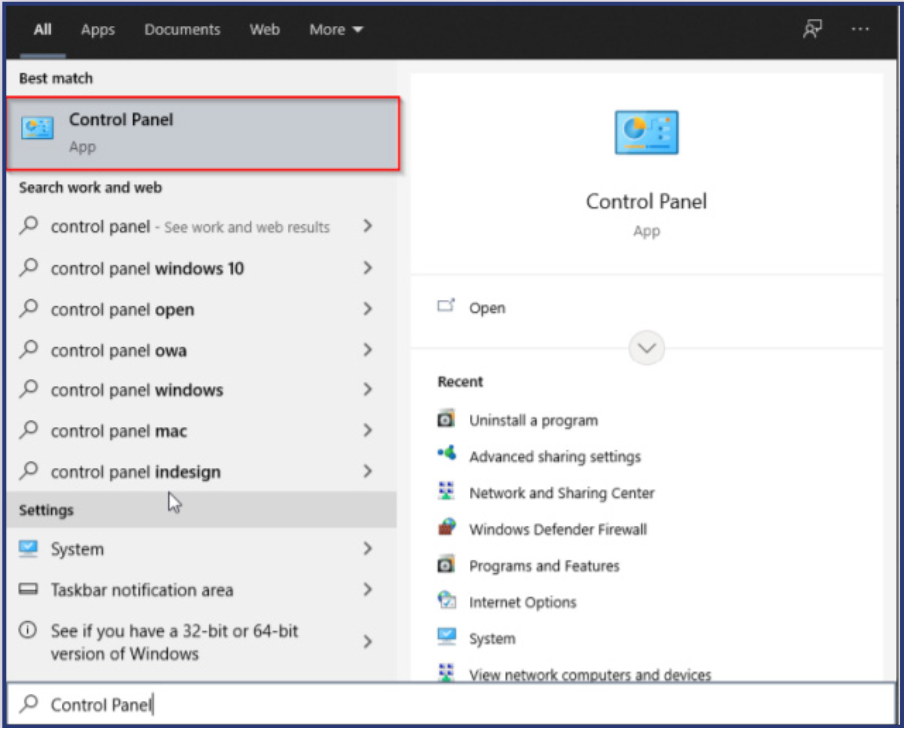
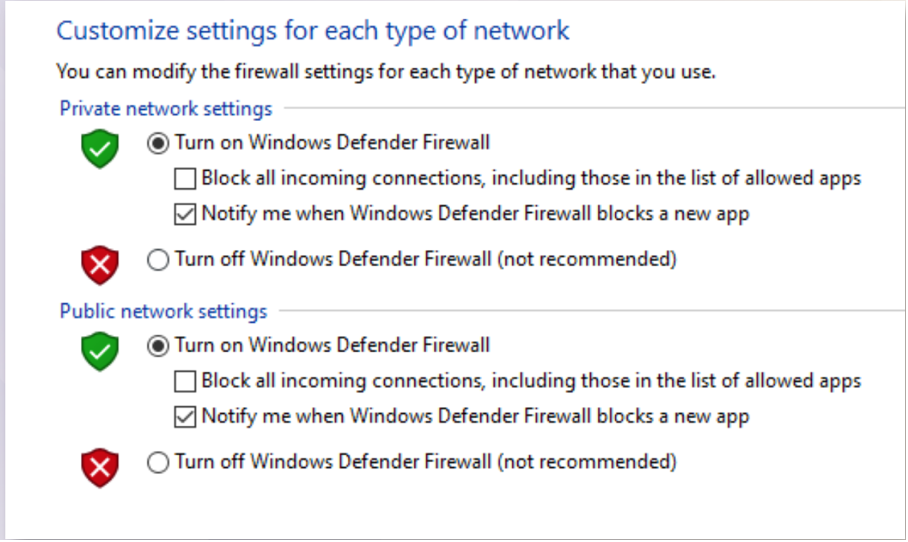
<p style="text-align: justify;"><span style="font-size:18px;"><span style="font-family:Times New Roman,Times,serif;">Trên hệ điều hành Windows, có thể kích hoạt tường lửa bằng cách truy cập chức năng Windows Defender Firewall trong Control Panel. Sau đó, lựa chọn “Turn Win-dows Firewall on or off” để thực hiện việc kích hoạt. Tiếp tục chọn “Turn on…” và tùy chọn bên dưới để kích hoạt. Các bước thực hiện cụ thể như sau:</span></span></p>

<p style="text-align: justify;"><span style="font-size:18px;"><span style="font-family:Times New Roman,Times,serif;"><strong><u>Bước 1:</u></strong>&nbsp;Tại thanh Tìm kiếm, nhập Control Panel, sau đó nhấn chọn vào</span></span><br />
&nbsp;</p>

<div class="image-center"><img alt="anh chup man hinh 2024 02 21 luc 13 35 36" height="646" src="https://sotttt.tayninh.gov.vn/uploads/news/2024_05/anh-chup-man-hinh-2024-02-21-luc-13.35.36.png" width="800" /></div>
<br />
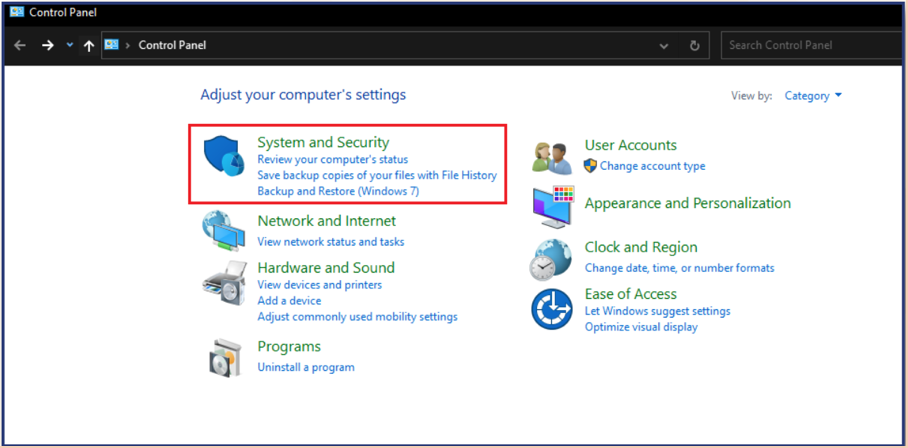
<span style="font-size:18px;"><span style="font-family:Times New Roman,Times,serif;"><strong><u>Bước 2:</u></strong>&nbsp;Sau đó tại giao diện tiếp theo, nhấn chọn “System and Security”<br />
&nbsp;</span></span>

<div class="image-center"><img alt="" height="395" src="https://vn-cop.vn/storage/A%CC%89nh-chu%CC%A3p-Ma%CC%80n-hi%CC%80nh-2024-02-21-lu%CC%81c-13.36.36.png" width="800" /></div>

<div style="text-align: justify;"><span style="font-size:18px;"><span style="font-family:Times New Roman,Times,serif;">&nbsp;</span></span></div>

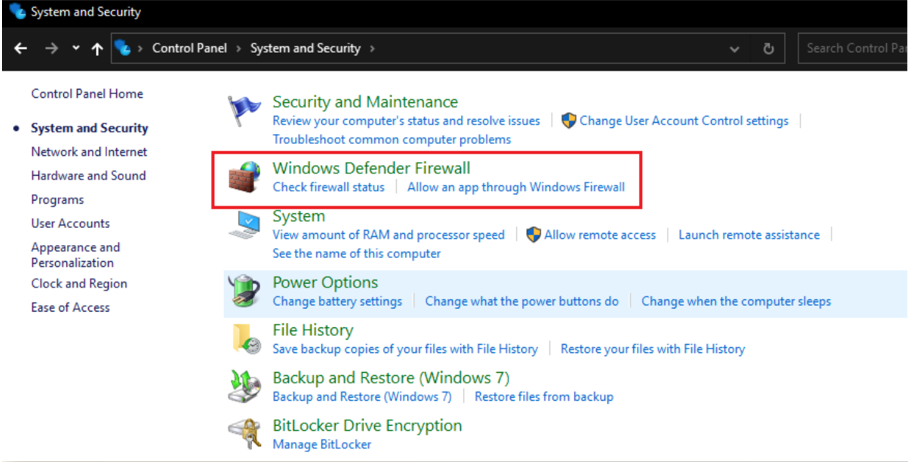
<p style="text-align: justify;"><span style="font-size:18px;"><span style="font-family:Times New Roman,Times,serif;"><strong><u>Bước 3:&nbsp;</u></strong>Chọn tiếp vào mục “Windows Defender Firewall”</span></span><br />
<br />
&nbsp;</p>

<div class="image-center"><img alt="" height="403" src="https://vn-cop.vn/storage/0-02-06-f42169f39821dfc3f41727b5fa7bb9eadd805037a480937d8cc403f1150ad734_5318d7d5695c5c96.png" width="800" /></div>

<div style="text-align: justify;"><span style="font-size:18px;"><span style="font-family:Times New Roman,Times,serif;">&nbsp;</span></span></div>

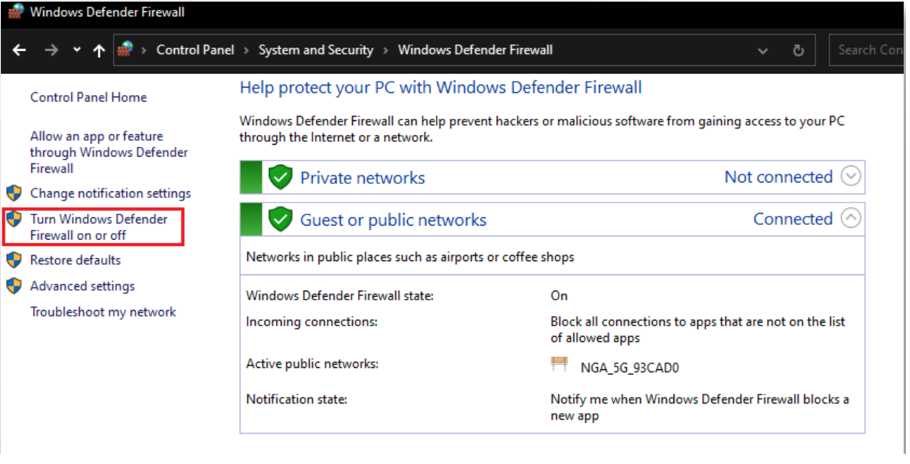
<p style="text-align: justify;"><span style="font-size:18px;"><span style="font-family:Times New Roman,Times,serif;"><strong><u>Bước 4:</u></strong>&nbsp;Chọn “Turn Windows Defender Firewall on or off” ở bên trái màn hình</span></span><br />
<br />
&nbsp;</p>

<div class="image-center"><img alt="" height="408" src="https://vn-cop.vn/storage/A%CC%89nh-chu%CC%A3p-Ma%CC%80n-hi%CC%80nh-2024-02-21-lu%CC%81c-13.37.39.png" width="800" /></div>

<div style="text-align: justify;"><span style="font-size:18px;"><span style="font-family:Times New Roman,Times,serif;">&nbsp;</span></span></div>

<p style="text-align: justify;"><span style="font-size:18px;"><span style="font-family:Times New Roman,Times,serif;"><strong><u>Bước 5:</u></strong>&nbsp;Lựa chọn bật tường lửa và nhấn vào mục OK để hoàn tất cài đặt</span></span><br />
&nbsp;</p>

<div class="image-center"><img alt="" height="478" src="https://vn-cop.vn/storage/A%CC%89nh-chu%CC%A3p-Ma%CC%80n-hi%CC%80nh-2024-02-21-lu%CC%81c-13.38.01.png" width="800" /></div>

<div style="text-align: justify;"><span style="font-size:18px;"><span style="font-family:Times New Roman,Times,serif;">&nbsp;</span></span></div>

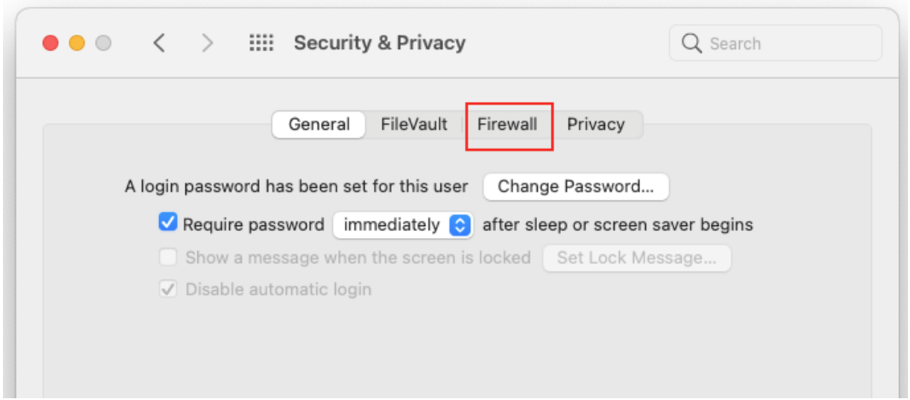
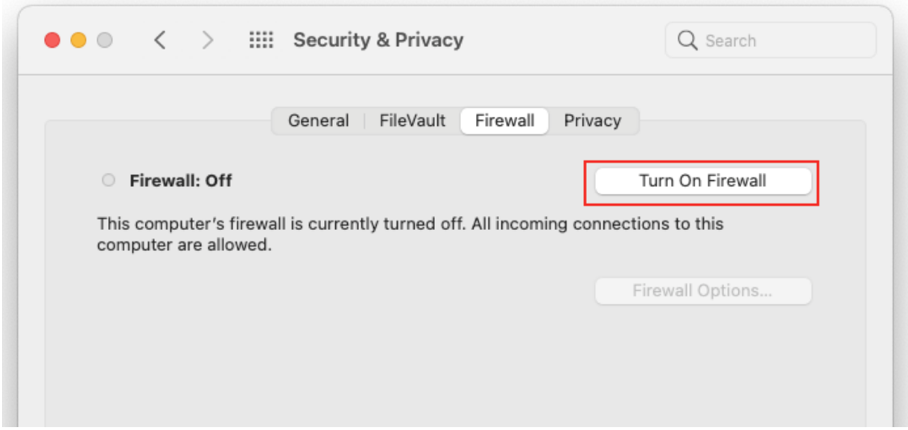
<p style="text-align: justify;"><span style="font-size:18px;"><span style="font-family:Times New Roman,Times,serif;"><strong>Kích hoạt tường lửa trên MacOS:&nbsp;</strong>Hệ điều hành MacOS có tường lửa nhưng mặc định không bật. Để kích hoạt tường lửa thực hiện như sau:</span></span></p>

<p style="text-align: justify;"><span style="font-size:18px;"><span style="font-family:Times New Roman,Times,serif;"><strong><u>Bước 1:</u></strong>&nbsp;Vào System Preferences -&gt; Security &amp; Privacy -&gt; Nhấp chọn Firewall</span></span></p>

<div class="image-center"><img alt="" height="352" src="https://vn-cop.vn/storage/A%CC%89nh-chu%CC%A3p-Ma%CC%80n-hi%CC%80nh-2024-02-21-lu%CC%81c-13.38.17.png" width="800" /></div>

<div style="text-align: justify;"><span style="font-size:18px;"><span style="font-family:Times New Roman,Times,serif;">&nbsp;</span></span></div>

<p style="text-align: justify;"><span style="font-size:18px;"><span style="font-family:Times New Roman,Times,serif;"><strong><u>Bước 2:</u></strong>&nbsp;Nhấp vào ổ khóa ở dưới cùng -&gt; Nhập thông tin đăng nhập -&gt; Turn on Firewall</span></span><br />
<br />
&nbsp;</p>

<div class="image-center"><img alt="" height="379" src="https://vn-cop.vn/storage/A%CC%89nh-chu%CC%A3p-Ma%CC%80n-hi%CC%80nh-2024-02-21-lu%CC%81c-13.40.50.png" width="800" /></div>

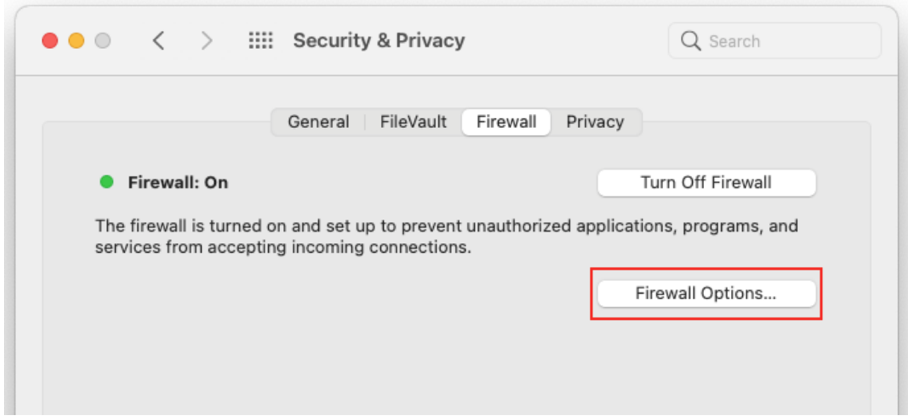
<p style="text-align: justify;"><span style="font-size:18px;"><span style="font-family:Times New Roman,Times,serif;">Nhấp vào Firewall Options nếu bạn muốn điều chỉnh cài đặt tường lửa</span></span><br />
<br />
&nbsp;</p>

<div class="image-center"><img alt="" height="368" src="https://vn-cop.vn/storage/A%CC%89nh-chu%CC%A3p-Ma%CC%80n-hi%CC%80nh-2024-02-21-lu%CC%81c-13.41.39.png" width="800" /></div>

<p style="text-align: justify;">&nbsp;</p>

<p style="text-align: justify;"><span style="font-size:18px;"><span style="font-family:Times New Roman,Times,serif;"><strong>Tắt tính năng chia sẻ file, folder hay máy in trên máy tính dùng hệ điều hành Windows 10</strong></span></span></p>

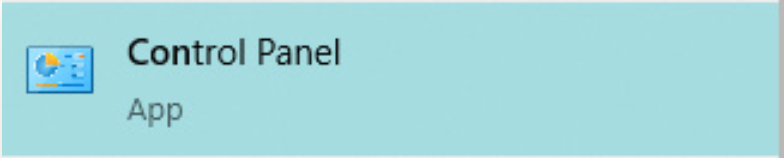
<p style="text-align: justify;"><span style="font-size:18px;"><span style="font-family:Times New Roman,Times,serif;"><strong><u>Bước 1:</u></strong>&nbsp;Tại mục tìm kiếm trên máy tính vào “Control Panel”</span></span></p>

<div class="image-center"><img alt="" height="161" src="https://vn-cop.vn/storage/A%CC%89nh-chu%CC%A3p-Ma%CC%80n-hi%CC%80nh-2024-02-21-lu%CC%81c-13.42.09.png" width="800" /></div>

<p style="text-align: justify;"><br />
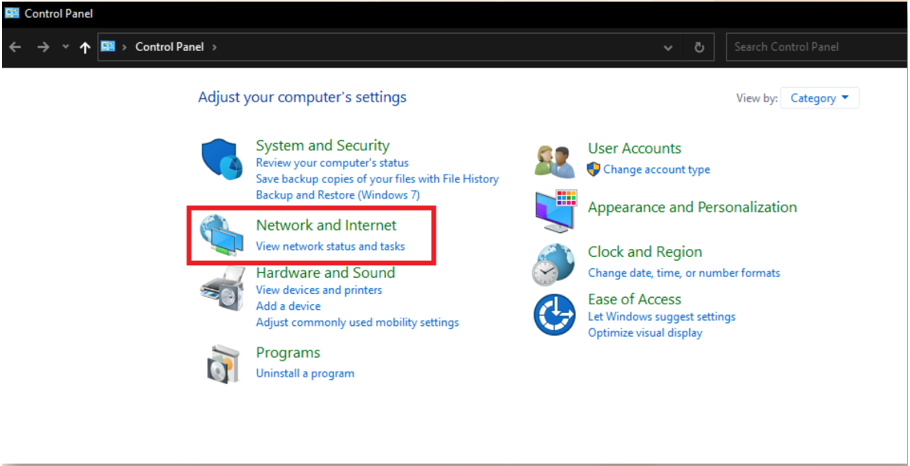
<span style="font-size:18px;"><span style="font-family:Times New Roman,Times,serif;"><strong><u>Bước 2:</u></strong>&nbsp;Tại đây, chọn “Network and Internet”</span></span><br />
<br />
&nbsp;</p>

<div class="image-center"><img alt="" height="410" src="https://vn-cop.vn/storage/A%CC%89nh-chu%CC%A3p-Ma%CC%80n-hi%CC%80nh-2024-02-21-lu%CC%81c-13.42.33.png" width="800" /></div>

<div style="text-align: justify;"><span style="font-size:18px;"><span style="font-family:Times New Roman,Times,serif;">&nbsp;</span></span></div>

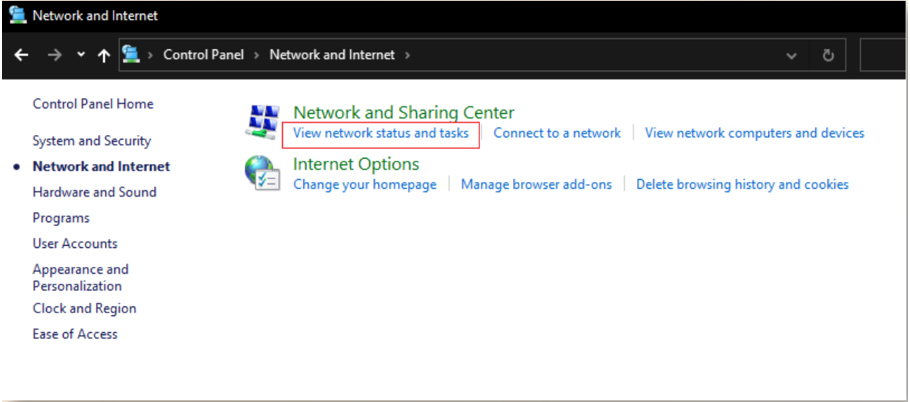
<p style="text-align: justify;"><span style="font-size:18px;"><span style="font-family:Times New Roman,Times,serif;"><strong><u>Bước 3:</u></strong>&nbsp;Chọn “View network status and tasks”</span></span><br />
&nbsp;</p>

<div class="image-center"><img alt="" height="353" src="https://vn-cop.vn/storage/A%CC%89nh-chu%CC%A3p-Ma%CC%80n-hi%CC%80nh-2024-02-21-lu%CC%81c-13.42.48.png" width="800" /></div>

<div style="text-align: justify;"><span style="font-size:18px;"><span style="font-family:Times New Roman,Times,serif;">&nbsp;</span></span></div>

<p style="text-align: justify;"><span style="font-size:18px;"><span style="font-family:Times New Roman,Times,serif;"><strong><u>Bước 4:</u></strong>&nbsp;Chọn “Change advance sharing settings” sau đó click chọn “Turn off file and printer sharing” và cuối cùng “Save changes” để lưu lại.</span></span></p>
<span style="font-size:18px;"><span style="font-family:Times New Roman,Times,serif;"> </span></span>

<div style="text-align: justify;"><span style="font-size:18px;"><span style="font-family:Times New Roman,Times,serif;"><strong>GIỚI HẠN VỀ THỜI GIAN TIẾP XÚC VỚI MÀN HÌNH ĐIỆN THOẠI</strong></span></span></div>

<p style="text-align: justify;"><span style="font-size:18px;"><span style="font-family:Times New Roman,Times,serif;">Trong thời đại kỹ thuật số phát triển, thời gian trẻ sử dụng thiết bị điện tử đã trở thành nỗi lo thường trực của nhiều gia đình. Các bậc phụ huynh được khuyên rằng nên hết sức lưu ý đến việc này, cần phải đặt ra thời gian sử dụng điện thoại cho trẻ, nhằm hạn chế tối đa những ảnh hưởng tiêu cực đến bé.</span></span></p>

<p style="text-align: justify;"><span style="font-size:18px;"><span style="font-family:Times New Roman,Times,serif;">Tổ chức Y tế Thế giới (WHO) khuyến cáo: trẻ dưới 1 tuổi không nên tiếp xúc với màn hình điện tử, trẻ từ 2-5 tuổi chỉ nên xem tối đa 1 giờ mỗi ngày những chương trình được cha mẹ kiểm duyệt. Trẻ em và thanh thiếu niên sử dụng thiết bị vượt quá 4-5 lần số thời gian quy định, sẽ gây ra những hậu quả nghiêm trọng, có thể đe dọa cuộc sống các em.</span></span></p>

<p style="text-align: justify;"><span style="font-size:18px;"><span style="font-family:Times New Roman,Times,serif;">Để giới hạn thời gian tiếp xúc với màn hình điện thoại, Sở Thông tin và Truyền thông giới thiệu một số cách làm sau:<br />
<br />
<strong>Đối với thiết bị điện thoại dùng hệ điều hành iOS:&nbsp;</strong>iOS là hệ điều hành trên các thiết bị di động của Apple gồm: iPhone, các mẫu iPad và iPod Touch.</span></span></p>

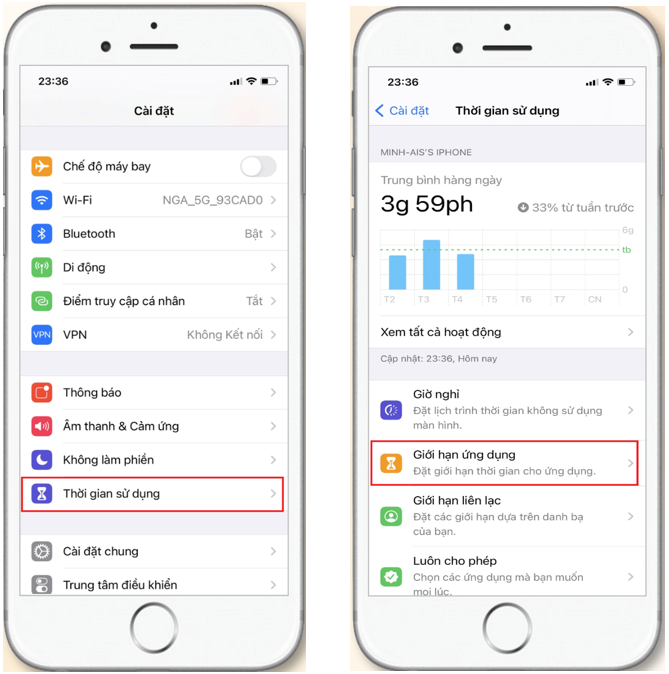
<p style="text-align: justify;"><span style="font-size:18px;"><span style="font-family:Times New Roman,Times,serif;"><strong><u>Bước 1:</u></strong>&nbsp;Vào mục “Cài đặt”, chọn “Thời gian sử dụng”, chọn “Giới hạn ứng dụng” để đặt giới hạn thời gian sử dụng cho các ứng dụng của trẻ.</span></span><br />
&nbsp;</p>

<div class="image-center"><img alt="" height="806" src="https://vn-cop.vn/storage/Screenshot-2024-02-29-155852.png" width="800" /></div>

<div style="text-align: justify;"><span style="font-size:18px;"><span style="font-family:Times New Roman,Times,serif;">&nbsp;</span></span></div>

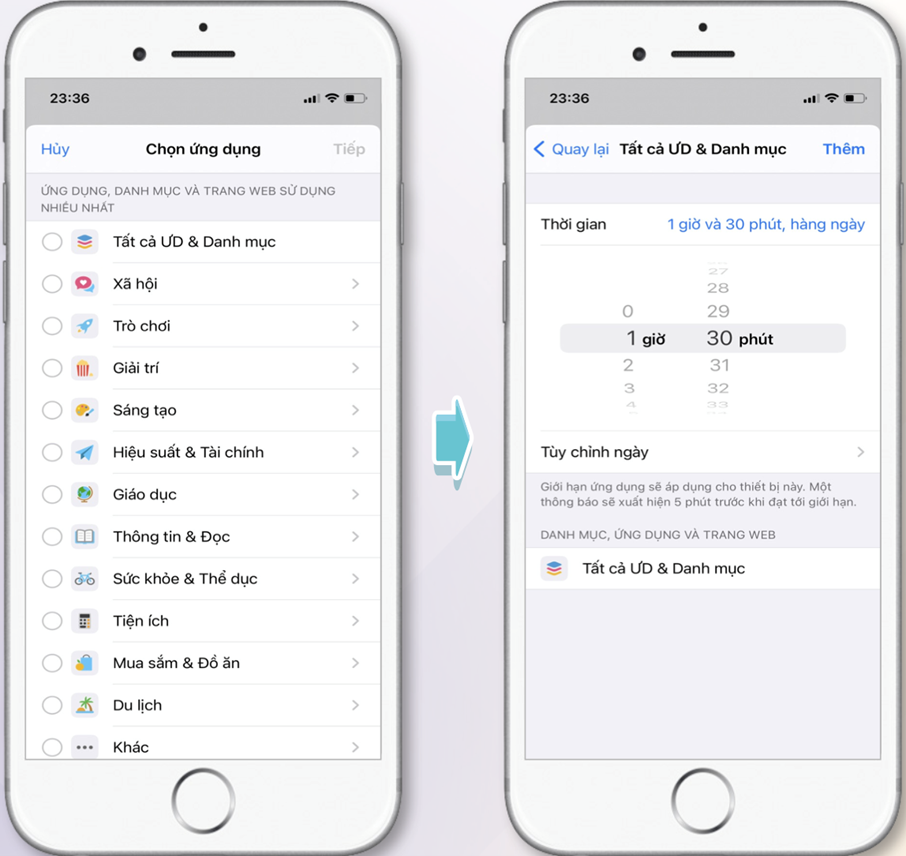
<p style="text-align: justify;"><span style="font-size:18px;"><span style="font-family:Times New Roman,Times,serif;"><strong><u>Bước 2:</u></strong>&nbsp;Bấm vào “Thêm giới hạn” chọn danh mục các ứng dụng muốn giới hạn thời gian rồi chọn “Tiếp”</span></span></p>

<p style="text-align: justify;"><span style="font-size:18px;"><span style="font-family:Times New Roman,Times,serif;"><strong><u>Bước 3:</u></strong>&nbsp;Lựa chọn thời gian giới hạn sử dụng phù hợp cho các ứng dụng này và chọn thêm</span></span><br />
<br />
&nbsp;</p>

<div class="image-center"><img alt="" height="756" src="https://vn-cop.vn/storage/Picture1-3.png" width="800" /></div>

<div style="text-align: justify;"><span style="font-size:18px;"><span style="font-family:Times New Roman,Times,serif;">&nbsp;</span></span></div>

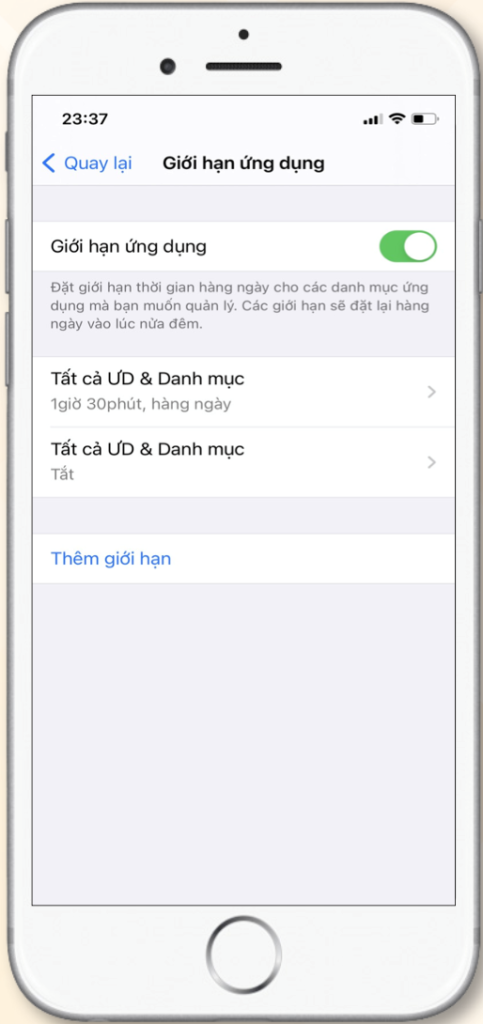
<p style="text-align: justify;"><span style="font-size:18px;"><span style="font-family:Times New Roman,Times,serif;"><strong><em><u>Lưu ý:</u></em></strong>&nbsp;Khi muốn tắt “Giới hạn ứng dụng” bạn chỉ cần gạt phím tắt sang bên trái.</span></span><br />
&nbsp;</p>

<div class="image-center"><img alt="" height="1696" src="https://vn-cop.vn/storage/Picture2-6-483x1024.png" width="800" /></div>

<div style="text-align: justify;"><span style="font-size:18px;"><span style="font-family:Times New Roman,Times,serif;">&nbsp;</span></span></div>

<p style="text-align: justify;"><span style="font-size:18px;"><span style="font-family:Times New Roman,Times,serif;"><strong>Đối với hệ điều hành Android:&nbsp;</strong>Android là một hệ điều hành được thiết kế dành cho các thiết bị di động của Samsung, Xiaomi, OPPO, Nokia, OnePlus, Huawei, Sony, Vivo…&nbsp;Dưới đây là các bước giới hạn thời gian tiếp xúc đối với màn hình của trẻ trên thiết bị Samsung.</span></span></p>

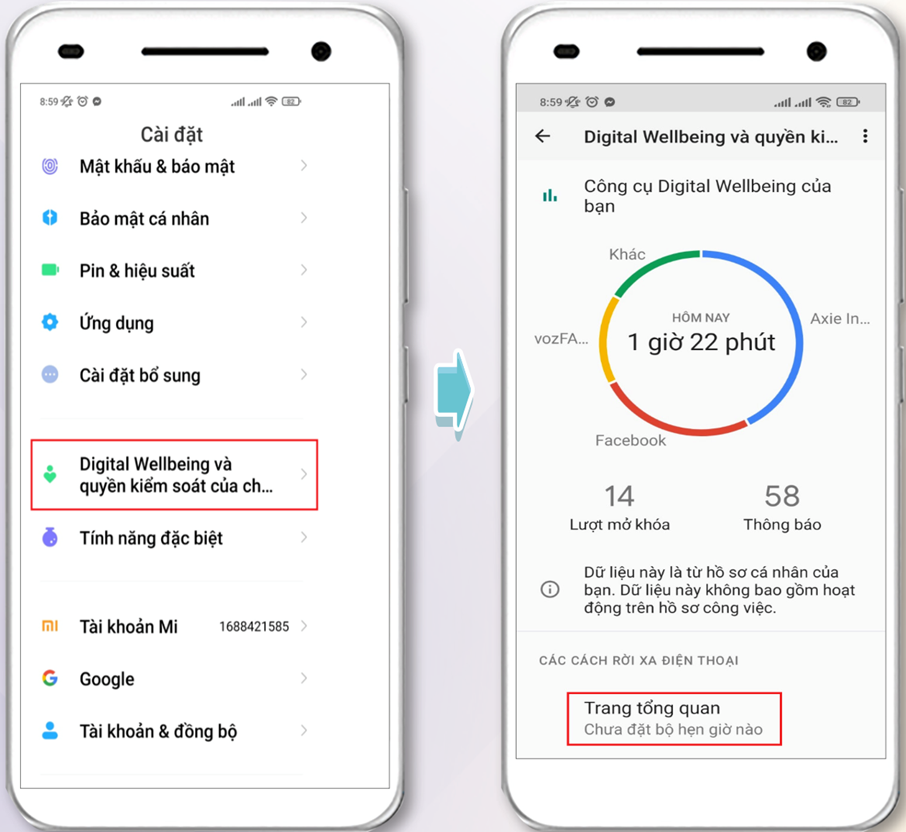
<p style="text-align: justify;"><span style="font-size:18px;"><span style="font-family:Times New Roman,Times,serif;"><strong><u>Bước 1:</u></strong>&nbsp;Vào ứng dụng “Cài đặt”, kéo xuống dưới và chọn tính năng Digital Wellbeing, trong một vài giao diện ứng dụng cài đặt khác nó sẽ có tên là “Cân bằng kỹ thuật số”</span></span></p>

<p style="text-align: justify;"><span style="font-size:18px;"><span style="font-family:Times New Roman,Times,serif;"><strong><u>Bước 2:</u></strong>&nbsp;Để giới hạn thời gian sử dụng ứng dụng của trẻ trên Android bạn hãy bấm vào “Trang tổng quan”</span></span></p>

<div class="image-center"><img alt="" height="735" src="https://vn-cop.vn/storage/Picture3.png" width="800" /></div>

<div style="text-align: justify;"><span style="font-size:18px;"><span style="font-family:Times New Roman,Times,serif;">&nbsp;</span></span></div>

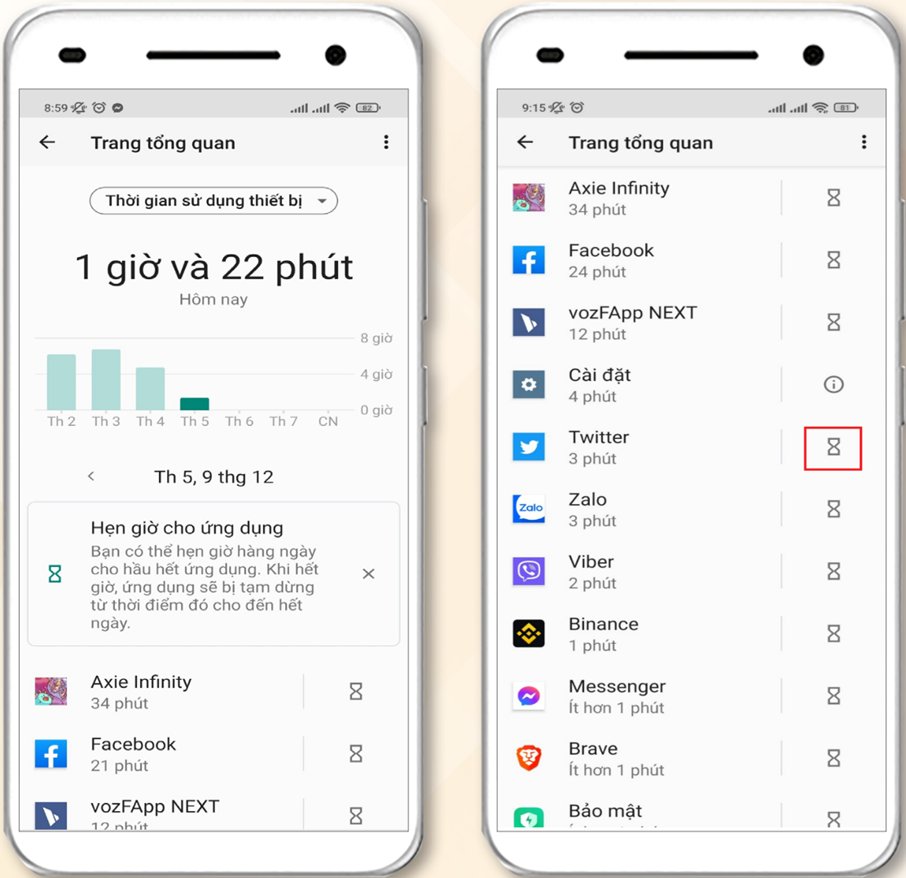
<p style="text-align: justify;"><span style="font-size:18px;"><span style="font-family:Times New Roman,Times,serif;"><strong><u>Bước 3:</u></strong>&nbsp;Trong tính năng “Trang tổng quan” sẽ hiển thị thời gian sử dụng của mỗi ứng dụng. Bấm vào biểu tượng đồng hồ cát bên phải ứng dụng để đặt thời gian cho ứng dụng muốn giới hạn</span></span><br />
<br />
&nbsp;</p>

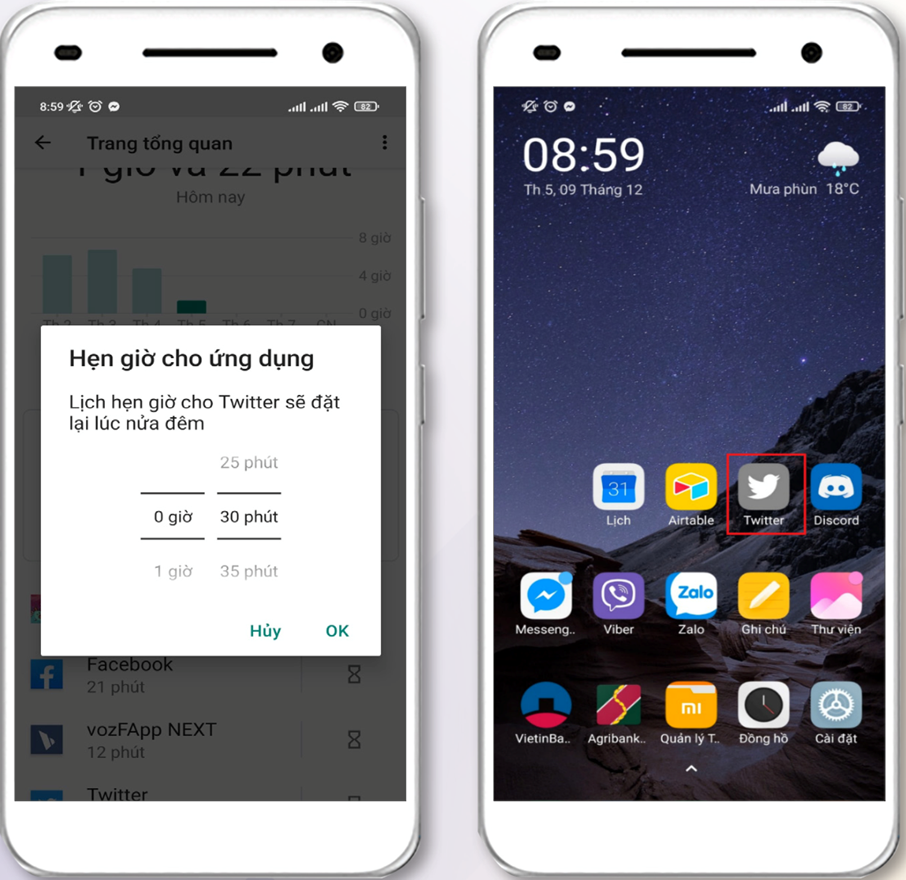
<div class="image-center"><img alt="" height="775" src="https://vn-cop.vn/storage/Picture4.png" width="800" /></div>

<div style="text-align: justify;"><span style="font-size:18px;"><span style="font-family:Times New Roman,Times,serif;">&nbsp;</span></span></div>

<p style="text-align: justify;"><span style="font-size:18px;"><span style="font-family:Times New Roman,Times,serif;"><strong><u>Bước 4:</u></strong>&nbsp;Đặt thời gian sử dụng ứng dụng theo mốc thời gian mong muốn và bấm “OK” để bắt đầu đặt thời gian sử dụng ứng dụng. Khi thoát ra ngoài màn hình bạn sẽ thấy ứng dụng đó được chuyển sang màu xám, và trẻ sẽ không thể khởi động được ứng dụng đó khi hết thời gian sử dụng mà bạn đặt ra</span></span><br />
<br />
&nbsp;</p>

<div class="image-center"><img alt="" height="777" src="https://vn-cop.vn/storage/Picture5.png" width="800" /></div>

<div style="text-align: justify;"><span style="font-size:18px;"><span style="font-family:Times New Roman,Times,serif;">&nbsp;</span></span></div>

<p style="text-align: justify;"><span style="font-size:18px;"><span style="font-family:Times New Roman,Times,serif;">Không chỉ riêng thế giới mà ngay cả Việt Nam hiện nay đã và đang bước vào thời đại chuyển đổi số mạnh mẽ. Kéo theo đó là sự phát triển đa dạng về các thiết bị kết nối, nền tảng mạng xã hội và ứng dụng di động đã tạo nên thay đổi lớn trong thói quen sinh hoạt của con người và trẻ em không phải là đối tượng ngoại lệ.</span></span></p>

<p style="text-align: justify;"><span style="font-size:18px;"><span style="font-family:Times New Roman,Times,serif;">Trẻ em sử dụng mạng xã hội sớm là một thực trạng đáng lo ngại trong xã hội hiện nay. Khi công nghệ và mạng xã hội phát triển thì các bé tiếp xúc với mạng xã hội ngay từ nhỏ. Thay vì lựa chọn các trò chơi trẻ con bổ ích, lành mạnh khác các bé lại hay lựa chọn chơi mạng xã hội hơn. Và nếu cha mẹ không kiểm soát kịp thời sẽ gây ra những hậu quả ảnh hưởng nghiêm trọng đến tâm lí và tinh thần non nớt của các bé.</span></span></p>

<p style="text-align: justify;"><span style="font-size:18px;"><span style="font-family:Times New Roman,Times,serif;"><strong>THIẾT LẬP CÁC TÍNH NĂNG BẢO MẬT ĐỐI VỚI MẠNG XÃ HỘI (FACEBOOK)</strong></span></span></p>

<p style="text-align: justify;"><span style="font-size:18px;"><span style="font-family:Times New Roman,Times,serif;">Facebook là một mạng xã hội của Mỹ, là một trong những mạng xã hội lớn nhất thế giới, nó tạo điều kiện giao tiếp giữa người dùng, chia sẻ dữ liệu đa phương tiện, duy trì các mối quan hệ xã hội và giải trí trực tuyến.</span></span></p>

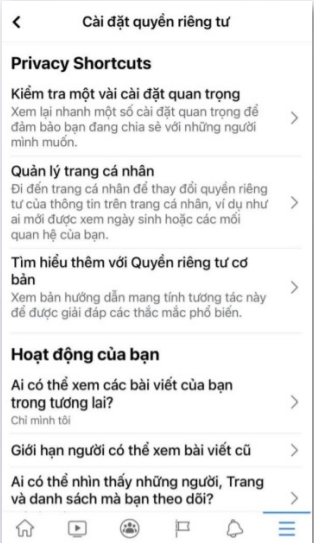
<p style="text-align: justify;"><span style="font-size:18px;"><span style="font-family:Times New Roman,Times,serif;"><strong>Cài đặt quyền riêng tư:&nbsp;</strong>Đăng nhập vào Facebook, nhấp vào menu “Cài đặt”. Chọn “Quyền riêng tư” để xem và chỉnh sửa những ai có thể xem ảnh, hoạt động và thông tin của trẻ</span></span></p>

<div class="image-center"><img alt="" height="1383" src="https://vn-cop.vn/storage/Picture1-4.png" width="800" /></div>

<div style="text-align: justify;"><span style="font-size:18px;"><span style="font-family:Times New Roman,Times,serif;">&nbsp;</span></span></div>

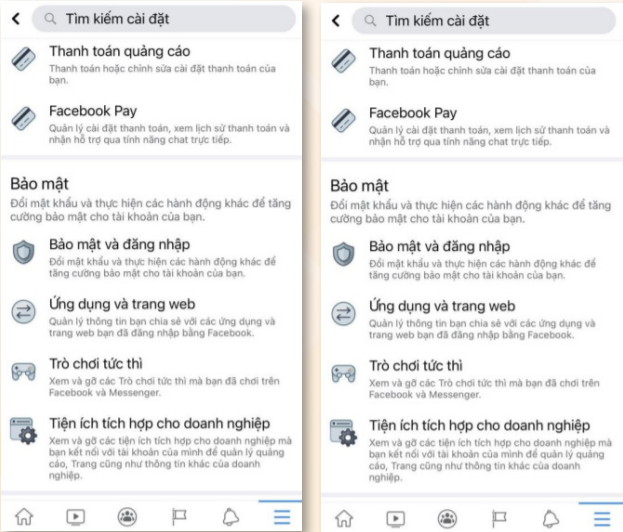
<p style="text-align: justify;"><span style="font-size:18px;"><span style="font-family:Times New Roman,Times,serif;">Chọn “Ứng dụng và Trang web” để kiểm soát quyền truy cập vào tài khoản Facebook của trẻ bằng các ứng dụng và trang web.</span></span><br />
<br />
&nbsp;</p>

<div class="image-center"><img alt="" height="683" src="https://vn-cop.vn/storage/Picture2-8.png" width="800" /></div>

<div style="text-align: justify;"><span style="font-size:18px;"><span style="font-family:Times New Roman,Times,serif;">&nbsp;</span></span></div>

<p style="text-align: justify;"><span style="font-size:18px;"><span style="font-family:Times New Roman,Times,serif;">Chọn <strong>“Có”</strong> để chặn người dùng cụ thể hoặc lời mời ứng dụng</span></span><br />
<br />
&nbsp;</p>

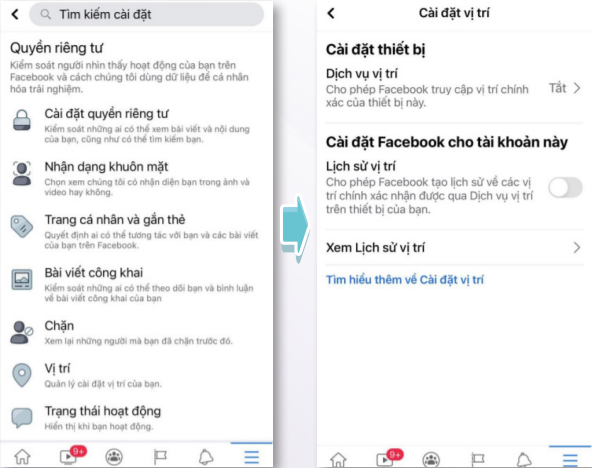
<p style="text-align: justify;"><span style="font-size:18px;"><span style="font-family:Times New Roman,Times,serif;"><strong>Ẩn vị trí người dùng:&nbsp;</strong>Facebook sử dụng dữ liệu vị trí để cung cấp tin tức cho người dùng hoặc bán những thứ người dùng quan tâm. Nếu tắt dịch vụ vị trí, nó sẽ không thể sử dụng vị trí chính xác của người dùng để nhằm mục tiêu trẻ bằng quảng cáo. Thật không may, Facebook vẫn có quyền truy cập vào vị trí mạng của trẻ, vì vậy bạn sẽ cần phải tắt tính năng này trên cả điện thoại và ứng dụng của trẻ. Để tắt dịch vụ định vị của ứng dụng Facebook trên điện thoại: Đi tới “Cài đặt” của điện thoại và nhấn vào “Quyền riêng tư”.</span></span><br />
&nbsp;</p>

<div class="image-center"><img alt="" height="632" src="https://vn-cop.vn/storage/Picture3-1.png" width="800" /></div>

<p style="text-align: justify;"><span style="font-size:18px;"><span style="font-family:Times New Roman,Times,serif;">Nhấn vào “Vị trí”. Sẽ xuất hiện màn hình cài đặt vị trí: Ở đây bạn có thể tắt tính năng “Cho phép Facebook truy cập vị trí chính xác của thiết bị này” và tính năng “Cho phép Facebook tạo lịch sử về các vị trí chính xác nhận được qua Dịch vụ vị trí trên thiết bị của bạn”.</span></span></p>

<p style="text-align: justify;"><span style="font-size:18px;"><span style="font-family:Times New Roman,Times,serif;"><strong>Bật xác thực 2 lớp:&nbsp;</strong>Xác thực hai yếu tố là một trong những cách mạnh nhất để bảo mật hồ sơ của trẻ khỏi những lần đăng nhập không mong muốn. Khi ai đó cố gắng đột nhập vào tài khoản đã bật 2FA, họ không thể vào mà không có mã xác thực OTP. Vì mã được chuyển đến điện thoại của bạn nên chỉ bạn mới có thể đăng nhập.</span></span></p>

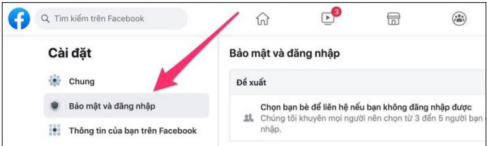
<p style="text-align: justify;"><span style="font-size:18px;"><span style="font-family:Times New Roman,Times,serif;"><strong><u>Bước 1:</u></strong>&nbsp;Truy cập Facebook.com/settings.</span></span></p>

<p style="text-align: justify;"><span style="font-size:18px;"><span style="font-family:Times New Roman,Times,serif;"><strong><u>Bước 2:</u></strong>&nbsp;Chọn Security and Login (Bảo mật và đăng nhập).</span></span></p>

<div class="image-center"><img alt="" height="240" src="https://vn-cop.vn/storage/Picture4-1.png" width="800" /></div>

<div style="text-align: justify;"><span style="font-size:18px;"><span style="font-family:Times New Roman,Times,serif;">&nbsp;</span></span></div>

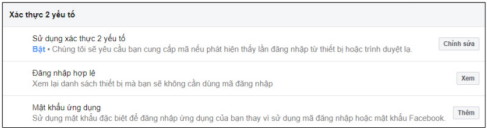
<p style="text-align: justify;"><span style="font-size:18px;"><span style="font-family:Times New Roman,Times,serif;"><strong><u>Bước 3:</u></strong>&nbsp;Chọn Two-factor authentication (Xác thực 2 yếu tố).</span></span></p>

<p style="text-align: justify;"><span style="font-size:18px;"><span style="font-family:Times New Roman,Times,serif;">Chọn Edit (chỉnh sửa) và Nhập lại mật khẩu</span></span><br />
&nbsp;</p>

<div class="image-center"><img alt="" height="210" src="https://vn-cop.vn/storage/Picture5-1.png" width="800" /></div>

<div style="text-align: justify;"><span style="font-size:18px;"><span style="font-family:Times New Roman,Times,serif;">&nbsp;</span></span></div>

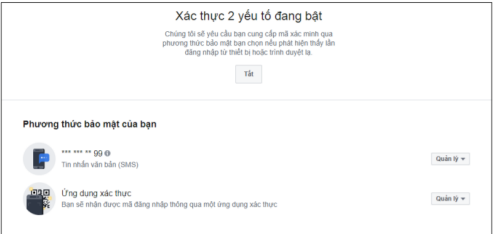
<p style="text-align: justify;"><span style="font-size:18px;"><span style="font-family:Times New Roman,Times,serif;"><strong>Bước 4:</strong>&nbsp;Chọn Use authentication app (Ứng dụng xác thực)</span></span><br />
&nbsp;</p>

<div class="image-center"><img alt="" height="379" src="https://vn-cop.vn/storage/Picture6-1.png" width="800" /></div>

<div style="text-align: justify;"><span style="font-size:18px;"><span style="font-family:Times New Roman,Times,serif;">&nbsp;</span></span></div>

<p style="text-align: justify;"><span style="font-size:18px;"><span style="font-family:Times New Roman,Times,serif;"><strong><u>Bước 5:</u></strong>&nbsp;Tải ứng dụng xác thực của bên Thứ 3 (Google Authenticator, Microsoft Authenticator, LastPass Authenticator,…) trên điện thoại.</span></span></p>

<p style="text-align: justify;"><span style="font-size:18px;"><span style="font-family:Times New Roman,Times,serif;"><strong><u>Bước 6:</u></strong>&nbsp;Hoàn tất cài đặt ứng dụng xác thực, mở&nbsp; và quét mã QR hoặc nhập mã hiển thị trên màn hình, bấm Continue (Tiếp tục).</span></span></p>

<p style="text-align: justify;"><span style="font-size:18px;"><span style="font-family:Times New Roman,Times,serif;"><strong><u>Bước 7:</u></strong>&nbsp;Nhập mã xác minh từ ứng dụng xác thực trên điện thoại vào hộp Twofactor authentication (Xác thực 2 yếu tố) và Bấm nút Continue (Tiếp tục).</span></span></p>

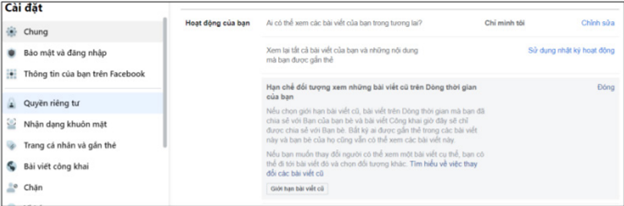
<p style="text-align: justify;"><span style="font-size:18px;"><span style="font-family:Times New Roman,Times,serif;"><strong>Giới hạn đối tượng cho các bài đăng cá nhân: </strong>việc này<strong>&nbsp;</strong>sẽ hạn chế các kết bạn, chia sẻ thông tin không phù hợp, nội dung độc hại đến trẻ. Từ máy tính, hãy làm theo các bước sau:</span></span></p>

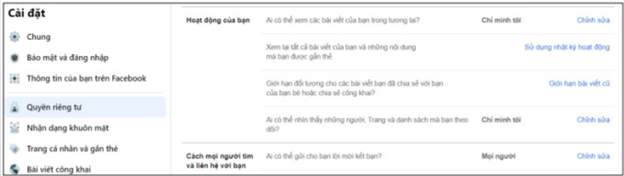
<p style="text-align: justify;"><span style="font-size:18px;"><span style="font-family:Times New Roman,Times,serif;">Mở lại “Cài đặt và Quyền riêng tư”, sau đó chọn “Cài đặt” và nhấp vào “Quyền riêng tư”</span></span></p>

<p style="text-align: justify;"><span style="font-size:18px;"><span style="font-family:Times New Roman,Times,serif;">Chọn “Ai có thể xem các bài viết trong tương lai của bạn?” và nhấp vào “Chỉnh sửa”. Bạn có thể điều chỉnh cài đặt cho các đối tượng cụ thể trong đó.</span></span><br />
&nbsp;</p>

<div class="image-center"><img alt="" height="226" src="https://vn-cop.vn/storage/Picture7-3.png" width="800" /></div>

<div style="text-align: justify;"><span style="font-size:18px;"><span style="font-family:Times New Roman,Times,serif;">&nbsp;</span></span></div>

<p style="text-align: justify;"><span style="font-size:18px;"><span style="font-family:Times New Roman,Times,serif;">Chọn “Giới hạn bài viết cũ” để thay đổi người có thể truy cập nội dung trước đó của trẻ</span></span><br />
&nbsp;</p>

<div class="image-center"><img alt="" height="264" src="https://vn-cop.vn/storage/Picture8.png" width="800" /></div>

<div style="text-align: justify;"><span style="font-size:18px;"><span style="font-family:Times New Roman,Times,serif;">&nbsp;</span></span></div>

<p style="text-align: justify;"><span style="font-size:18px;"><span style="font-family:Times New Roman,Times,serif;">Mọi người vô tình chia sẻ tất cả các loại sự kiện và thông tin cá nhân mà không nhận ra nó. Thay đổi cài đặt này có thể hạn chế các rủi ro giúp trẻ khỏi bị lừa đảo đoán chính xác hành vi của bạn.</span></span></p>

<p style="text-align: justify;"><span style="font-size:18px;"><span style="font-family:Times New Roman,Times,serif;">Hãy thường xuyên truy cập các thông tin, tìm hiểu thêm tài liệu giúp trang bị cho trẻ các kiến thức, kỹ năng, công cụ cần thiết về bảo vệ trẻ em trên môi trường mạng.</span></span></p>
		</div>
				<div id="author">
						<p>
				<strong>Tác giả:</strong>
				VN-COP
			</p>
		</div>
	</div>
	<div id="footer" class="clearfix">
		<div id="url">
			<strong>URL của bản tin này: </strong><a href="https://sotttt.tayninh.gov.vn/vi/news/savefile/thong-tin-tuyen-truyen/ky-nang-co-ban-de-su-dung-internet-an-toan-doi-voi-tre-em-ngay-nay-3386.html" title="Kỹ năng cơ bản để sử dụng Internet an toàn đối với trẻ em ngày nay">https://sotttt.tayninh.gov.vn/vi/news/savefile/thong-tin-tuyen-truyen/ky-nang-co-ban-de-su-dung-internet-an-toan-doi-voi-tre-em-ngay-nay-3386.html</a>

		</div>
		<div class="clear"></div>
		<div class="copyright">
			&copy; Sở Thông tin và Truyền thông tỉnh Tây Ninh
		</div>
		<div id="contact">
			<a href="mailto:sotttt@tayninh.gov.vn">sotttt@tayninh.gov.vn</a>
		</div>
	</div>
</div>
        <div id="timeoutsess" class="chromeframe">
            Bạn đã không sử dụng Site, <a onclick="timeoutsesscancel();" href="https://sotttt.tayninh.gov.vn/#">Bấm vào đây để duy trì trạng thái đăng nhập</a>. Thời gian chờ: <span id="secField"> 60 </span> giây
        </div>
        <div id="openidResult" class="nv-alert" style="display:none"></div>
        <div id="openidBt" data-result="" data-redirect=""></div>
<div id="run_cronjobs" style="visibility:hidden;display:none;"><img alt="cron" src="/index.php?second=cronjobs&amp;p=k0H6f7t8" width="1" height="1" /></div>
<script src="https://sotttt.tayninh.gov.vn/assets/js/jquery/jquery.min.js"></script>
<script>var nv_base_siteurl="/",nv_lang_data="vi",nv_lang_interface="vi",nv_name_variable="nv",nv_fc_variable="op",nv_lang_variable="language",nv_module_name="news",nv_func_name="savefile",nv_is_user=0, nv_my_ofs=-5,nv_my_abbr="EST",nv_cookie_prefix="nv4",nv_check_pass_mstime=1738000,nv_area_admin=0,nv_safemode=0,theme_responsive=1,nv_recaptcha_ver=2,nv_recaptcha_sitekey="",nv_recaptcha_type="image",XSSsanitize=1;</script>
<script src="https://sotttt.tayninh.gov.vn/assets/js/language/vi.js"></script>
<script src="https://sotttt.tayninh.gov.vn/assets/js/DOMPurify/purify.js"></script>
<script src="https://sotttt.tayninh.gov.vn/assets/js/global.js"></script>
<script src="https://sotttt.tayninh.gov.vn/assets/js/site.js"></script>
<script src="https://sotttt.tayninh.gov.vn/themes/default/js/news.js"></script>
<script src="https://sotttt.tayninh.gov.vn/assets/js/jquery/jquery.cookie.js"></script>
<script src="https://sotttt.tayninh.gov.vn/themes/egov/js/main.js"></script>
<script src="https://sotttt.tayninh.gov.vn/themes/egov/js/custom.js"></script>
<script type="text/javascript">
        var _govaq = window._govaq || [];
    _govaq.push(['trackPageView']);
    _govaq.push(['enableLinkTracking']);
    (function () {
        _govaq.push(['setTrackerUrl', 'https://f-emc.ngsp.gov.vn/tracking']);
        _govaq.push(['setSiteId', '52']);
        var d = document,
            g = d.createElement('script'),
            s = d.getElementsByTagName('script')[0];
        g.type = 'text/javascript';
        g.async = true;
        g.defer = true;
        g.src = 'https://f-emc.ngsp.gov.vn/embed/gov-tracking.min.js';
        s.parentNode.insertBefore(g, s);
    })();
    </script>
<script src="https://sotttt.tayninh.gov.vn/themes/egov/js/bootstrap.min.js"></script>
</body>
</html>